添加Memory功能
概述
想象这样一个场景:一位重要客户就其最近订单的问题联系我们的支持团队。他们解释了自己的偏好,表达了不满,并与我们的 agent 一起解决了问题。三周后,他们再次联系支持团队,提出了一个相关问题。但现在他们不得不重复所有内容——他们的偏好、历史记录、背景信息——因为我们的 agent 对之前的交互没有任何记忆。
这是当今大多数 AI agent 的现实。每次对话都从零开始,导致:
- 客户因需要反复重复信息而感到沮丧
- 无法基于之前交互的低效支持
- 错失提供个性化、主动服务的机会
- 因非个性化、通用回复导致客户满意度低下
Amazon Bedrock AgentCore Memory 通过提供托管服务来解决这一限制,使 AI agent 能够随时间维护上下文、记住重要事实,并提供一致的个性化体验。
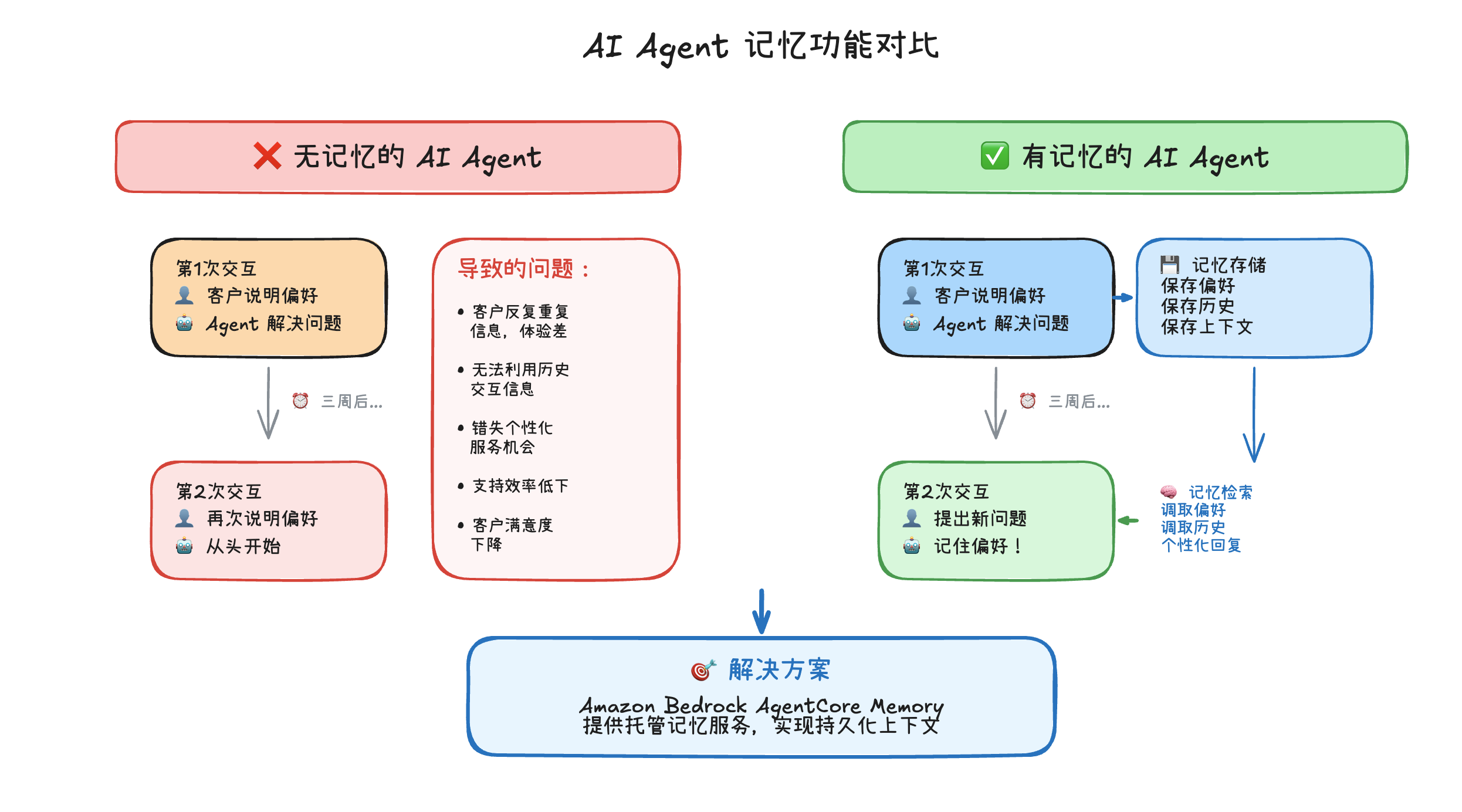
我们将通过智能记忆提供卓越的客户体验。 agent 将从一个健忘的原型进化为一个了解客户的助手,能够:
- “欢迎回来,Sarah!" —— 立即识别回头客
- “我记得我们偏好电子邮件更新” —— 自动回忆个人偏好
- “跟进我们上个月的笔记本电脑问题” —— 无缝连接相关对话
- “根据我们的购买历史,以下是我的推荐” —— 提供个性化建议
AgentCore Memory 的工作原理
AgentCore Memory 在两个层面上运作:
| 策略 | 用途 | 功能 |
|---|---|---|
| SEMANTIC | 事实与上下文 | 从对话中捕获事实信息(姓名、偏好、订单详情),并使其可跨会话检索 |
| SUMMARIZATION | 对话历史 | 压缩的对话摘要,提供跨会话的连续性 |
为项目添加记忆功能
使用 AgentCore CLI 添加记忆资源:
agentcore add memory \
  --name SharedMemory \
  --strategies SEMANTIC,SUMMARIZATION \
  --expiry 30
我们应该看到以下输出信息:
Added memory 'SharedMemory'
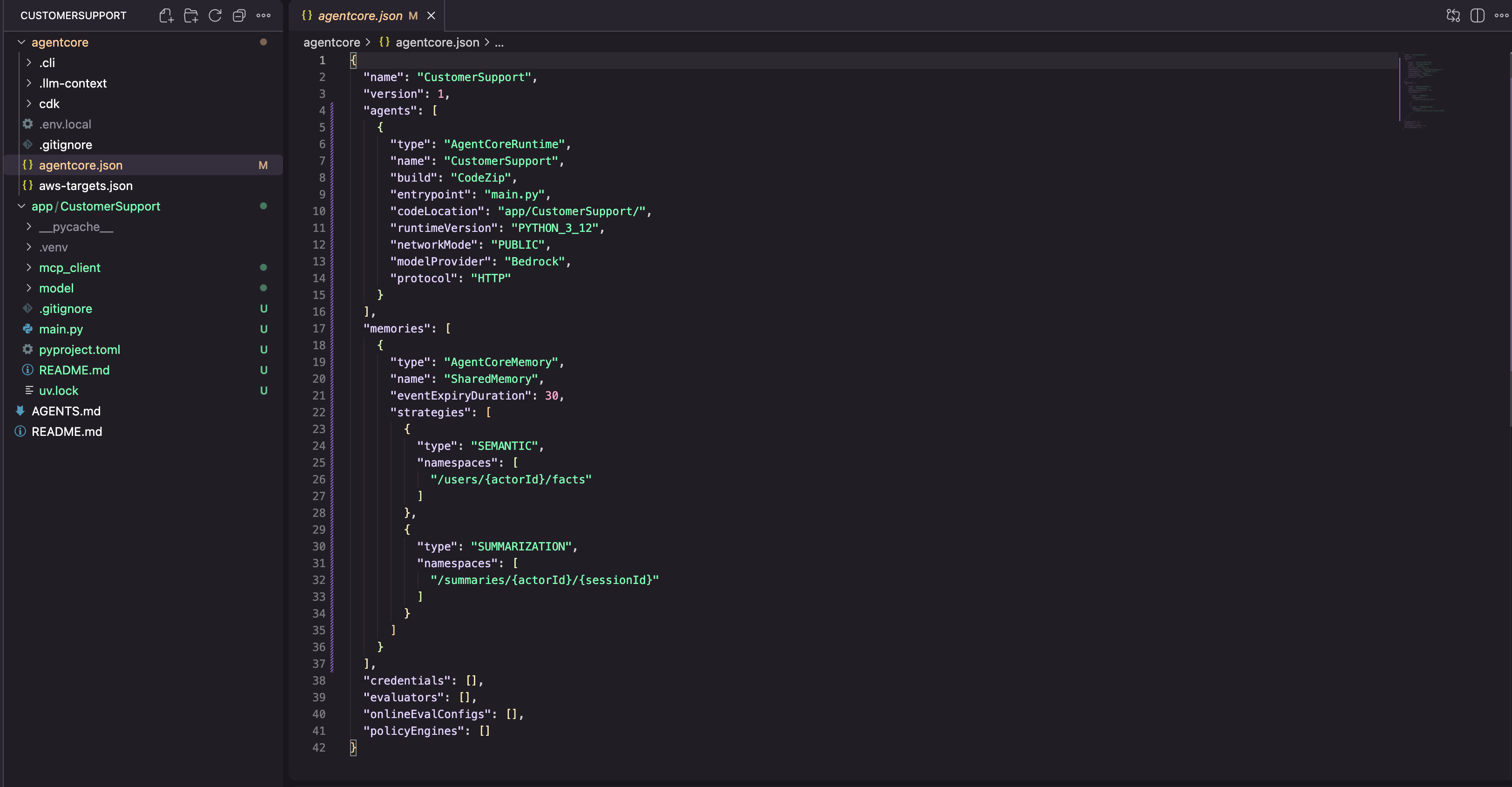
这将使用记忆配置更新我们的 agentcore/agentcore.json。我们可以验证:
cat agentcore/agentcore.json
memories 数组现在包含我们的记忆资源,其中包含 SEMANTIC 和 SUMMARIZATION 策略,每个策略都有自己的命名空间模式。
将记忆功能集成到我们的 Agent 代码中
CLI 在基础设施中创建记忆资源,但我们需要将其连接到 agent 代码中。在 terminal中,创建记忆会话管理器:
mkdir -p app/CustomerSupport/memory
touch app/CustomerSupport/memory/__init__.py
touch app/CustomerSupport/memory/session.py
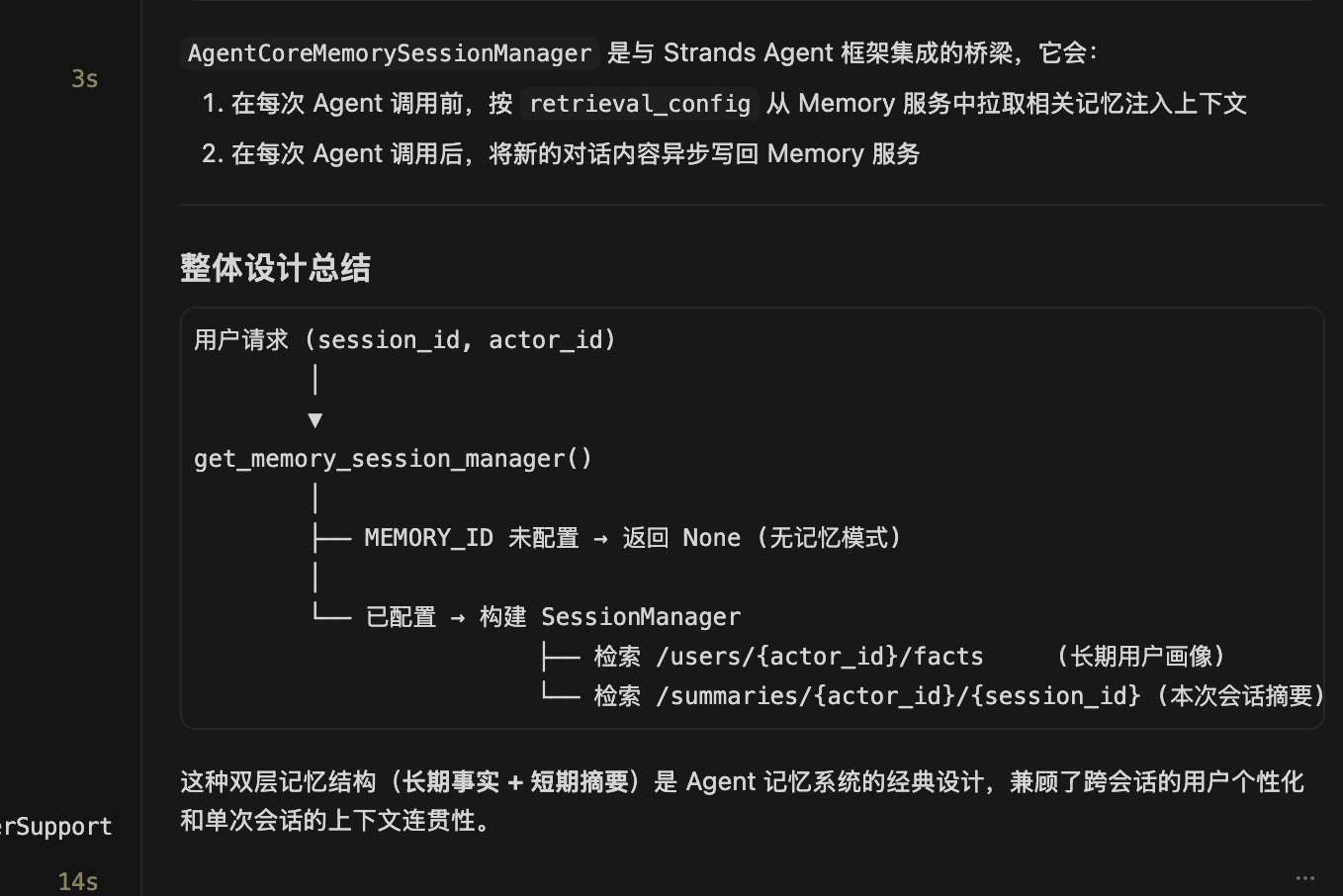
此模块创建一个记忆会话管理器,将我们的 agent 连接到 AgentCore Memory。它配置了两个检索命名空间:一个用于由 SEMANTIC 策略提取的用户特定事实(/users/{actorId}/facts),另一个用于来自 SUMMARIZATION 策略的对话摘要(/summaries/{actorId}/{sessionId})。MEMORY_SHAREDMEMORY_ID 环境变量在部署后由 AgentCore Runtime 自动注入。
打开 app/CustomerSupport/memory/session.py(在 Kiro 的编辑器中打开文件并复制以下代码):
import os
from typing import Optional
from bedrock_agentcore.memory.integrations.strands.config import AgentCoreMemoryConfig, RetrievalConfig
from bedrock_agentcore.memory.integrations.strands.session_manager import AgentCoreMemorySessionManager

MEMORY_ID = os.getenv("MEMORY_SHAREDMEMORY_ID")
REGION = os.getenv("AWS_REGION")

def get_memory_session_manager(session_id: str, actor_id: str) -> Optional[AgentCoreMemorySessionManager]:
    if not MEMORY_ID:
        return None

    retrieval_config = {
        f"/users/{actor_id}/facts": RetrievalConfig(top_k=3, relevance_score=0.5),
        f"/summaries/{actor_id}/{session_id}": RetrievalConfig(top_k=3, relevance_score=0.5)
    }

    return AgentCoreMemorySessionManager(
        AgentCoreMemoryConfig(
            memory_id=MEMORY_ID,
            session_id=session_id,
            actor_id=actor_id,
            retrieval_config=retrieval_config,
        ),
        REGION
    )
工作原理: 记忆 ID 在部署后由 AgentCore Runtime 作为环境变量(MEMORY_SHAREDMEMORY_ID)注入。会话管理器自动处理记忆记录的存储和检索。
更新 main.py 以使用记忆功能
在编辑器中打开 app/CustomerSupport/main.py。主要变更包括:
- 导入记忆会话管理器
- 使用工厂模式为每个会话/用户创建 agent
- 从运行时上下文中提取
session_id和user_id
主要区别在于 agent 工厂模式。我们不再使用单一的全局 agent,而是为每个会话/用户组合创建一个 agent,每个 agent 都有自己的 session_manager。这允许 agent 存储和检索限定于每个用户的记忆。invoke 函数现在从运行时上下文中提取 session_id 和 user_id,并将它们传递给工厂。
from strands import Agent, tool
from bedrock_agentcore.runtime import BedrockAgentCoreApp
from model.load import load_model
from mcp_client.client import get_streamable_http_mcp_client
from memory.session import get_memory_session_manager

app = BedrockAgentCoreApp()
log = app.logger

# Exa AI MCP client for web search
mcp_clients = [get_streamable_http_mcp_client()]

# --- Customer Support Tools ---

RETURN_POLICIES = {
    "electronics": {"window": "30 days", "condition": "Original packaging required, must be unused or defective", "refund": "Full refund to original payment method"},
    "accessories": {"window": "14 days", "condition": "Must be in original packaging, unused", "refund": "Store credit or exchange"},
    "audio": {"window": "30 days", "condition": "Defective items only after 15 days", "refund": "Full refund within 15 days, replacement after"},
}

PRODUCTS = {
    "PROD-001": {"name": "Wireless Headphones", "price": 79.99, "category": "audio", "description": "Noise-cancelling Bluetooth headphones with 30h battery life", "warranty_months": 12},
    "PROD-002": {"name": "Smart Watch", "price": 249.99, "category": "electronics", "description": "Fitness tracker with heart rate monitor, GPS, and 5-day battery", "warranty_months": 24},
    "PROD-003": {"name": "Laptop Stand", "price": 39.99, "category": "accessories", "description": "Adjustable aluminum laptop stand for ergonomic desk setup", "warranty_months": 6},
    "PROD-004": {"name": "USB-C Hub", "price": 54.99, "category": "accessories", "description": "7-in-1 USB-C hub with HDMI, USB-A, SD card reader, and ethernet", "warranty_months": 12},
    "PROD-005": {"name": "Mechanical Keyboard", "price": 129.99, "category": "electronics", "description": "RGB mechanical keyboard with Cherry MX switches", "warranty_months": 24},
}

@tool
def get_return_policy(product_category: str) -> str:
    """Get return policy information for a specific product category.

    Args:
        product_category: Product category (e.g., 'electronics', 'accessories', 'audio')

    Returns:
        Formatted return policy details including timeframes and conditions
    """
    category = product_category.lower()
    if category in RETURN_POLICIES:
        policy = RETURN_POLICIES[category]
        return f"Return policy for {category}: Window: {policy['window']}, Condition: {policy['condition']}, Refund: {policy['refund']}"
    return f"No specific return policy found for '{product_category}'. Please contact support for details."

@tool
def get_product_info(query: str) -> str:
    """Search for product information by name, ID, or keyword.

    Args:
        query: Product name, ID (e.g., 'PROD-001'), or search keyword

    Returns:
        Product details including name, price, category, and description
    """
    query_lower = query.lower()
    # Search by ID
    if query.upper() in PRODUCTS:
        p = PRODUCTS[query.upper()]
        return f"{p['name']} ({query.upper()}): ${p['price']}, Category: {p['category']}, {p['description']}, Warranty: {p['warranty_months']} months"
    # Search by keyword
    results = [f"{pid}: {p['name']} - ${p['price']} - {p['description']}" for pid, p in PRODUCTS.items()
               if query_lower in p['name'].lower() or query_lower in p['description'].lower() or query_lower in p['category'].lower()]
    if results:
        return "Found products:\n" + "\n".join(results)
    return f"No products found matching '{query}'."

tools = [get_return_policy, get_product_info]

# Add MCP client (Exa AI web search) to tools
for mcp_client in mcp_clients:
    if mcp_client:
        tools.append(mcp_client)

# Agent factory — creates one agent per session/user combination
def agent_factory():
    cache = {}
    def get_or_create_agent(session_id, user_id):
        key = f"{session_id}/{user_id}"
        if key not in cache:
            cache[key] = Agent(
                model=load_model(),
                session_manager=get_memory_session_manager(session_id, user_id),
                system_prompt="""You are a helpful and professional customer support assistant for an e-commerce company.
Your role is to:
- Provide accurate information using the tools available to you
- Be friendly, patient, and understanding with customers
- Always offer additional help after answering questions
- If you can't help with something, direct customers to the appropriate contact

You have access to the following tools:
1. get_return_policy() - For return policy questions
2. get_product_info() - To look up product information and specifications
3. Web search - To search the web for troubleshooting help

Always use the appropriate tool to get accurate, up-to-date information rather than guessing.""",
                tools=tools
            )
        return cache[key]
    return get_or_create_agent

get_or_create_agent = agent_factory()

@app.entrypoint
async def invoke(payload, context):
    log.info("Invoking Agent.....")

    session_id = getattr(context, 'session_id', 'default-session')
    user_id = getattr(context, 'user_id', 'default-user')
    agent = get_or_create_agent(session_id, user_id)

    stream = agent.stream_async(payload.get("prompt"))
    async for event in stream:
        if "data" in event and isinstance(event["data"], str):
            yield event["data"]


if __name__ == "__main__":
    app.run()
部署以启用记忆功能
Memory功能是一项云服务——它需要部署才能运行。
重新部署:
agentcore deploy -y -v
我们应该看到记忆资源被添加到我们现有的部署中:
✔ Load deployment target
✔ Validate project
✔ Build CDK project
✔ Synthesize CloudFormation
✔ Deploy to AWS
  - AWS::IAM::Role (ExecutionRole)
  - AWS::BedrockAgentCore::Memory (SharedMemory)
  - AWS::BedrockAgentCore::Runtime (CustomerSupport) [updated]
✔ Persist deployment state

✔ Deployed to 'default'
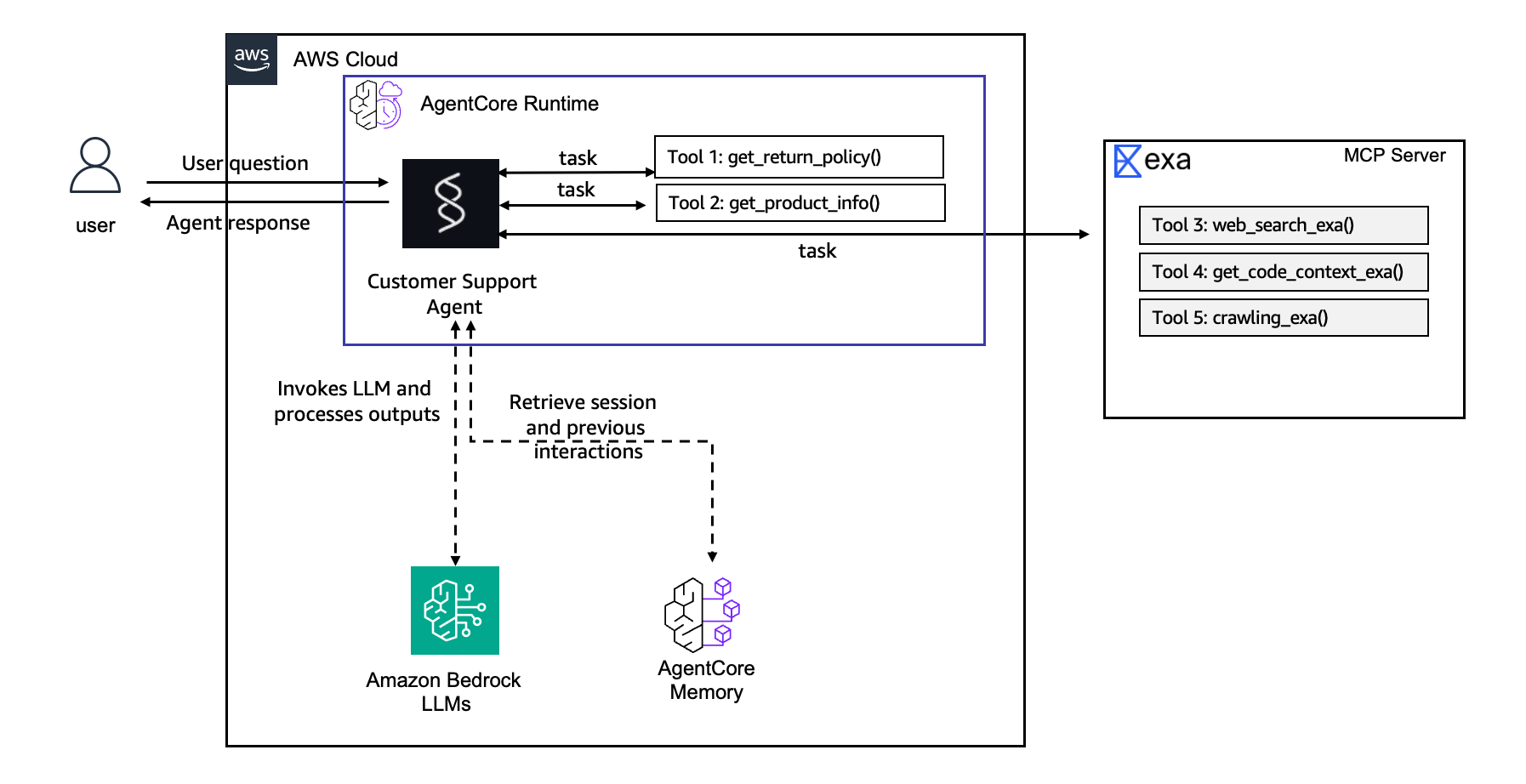
以下是更新后的架构:
测试记忆功能
现在让我们测试记忆功能是否能跨会话工作。首先,告诉 agent 一些关于我们自己的信息:
agentcore invoke "My name is Sarah and I prefer email updates. I recently bought a Smart Watch." --stream
等待约 1-2 分钟让记忆提取处理完成,然后开始一个全新的会话并询问:
sleep 2m
agentcore invoke "Do you know anything about me?" --stream
预期响应:
Yes! I know a few things about you, Sarah:
1. Your name is Sarah
2. You prefer email updates
3. You recently purchased a Smart Watch

在控制台上能看到这个memory:
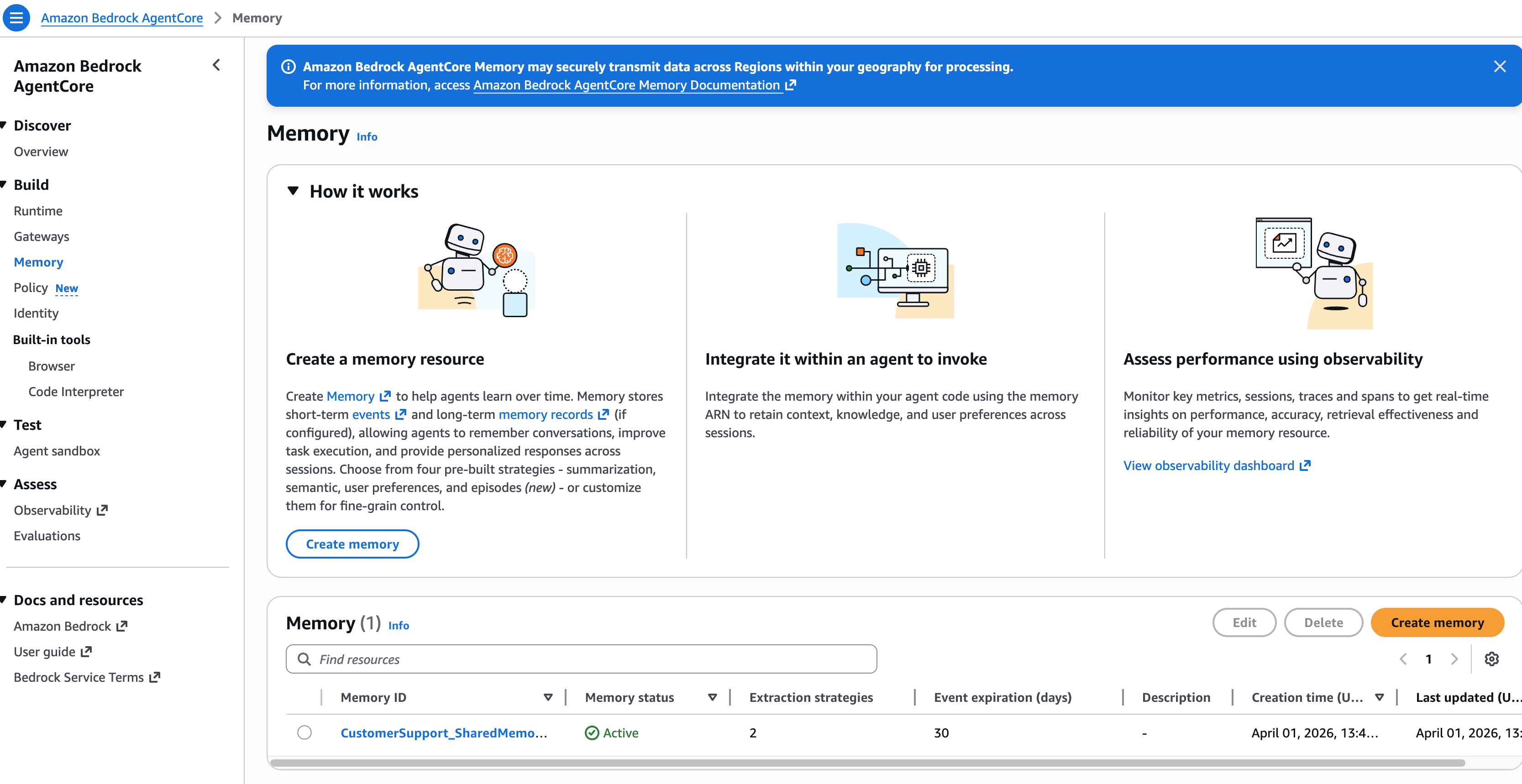
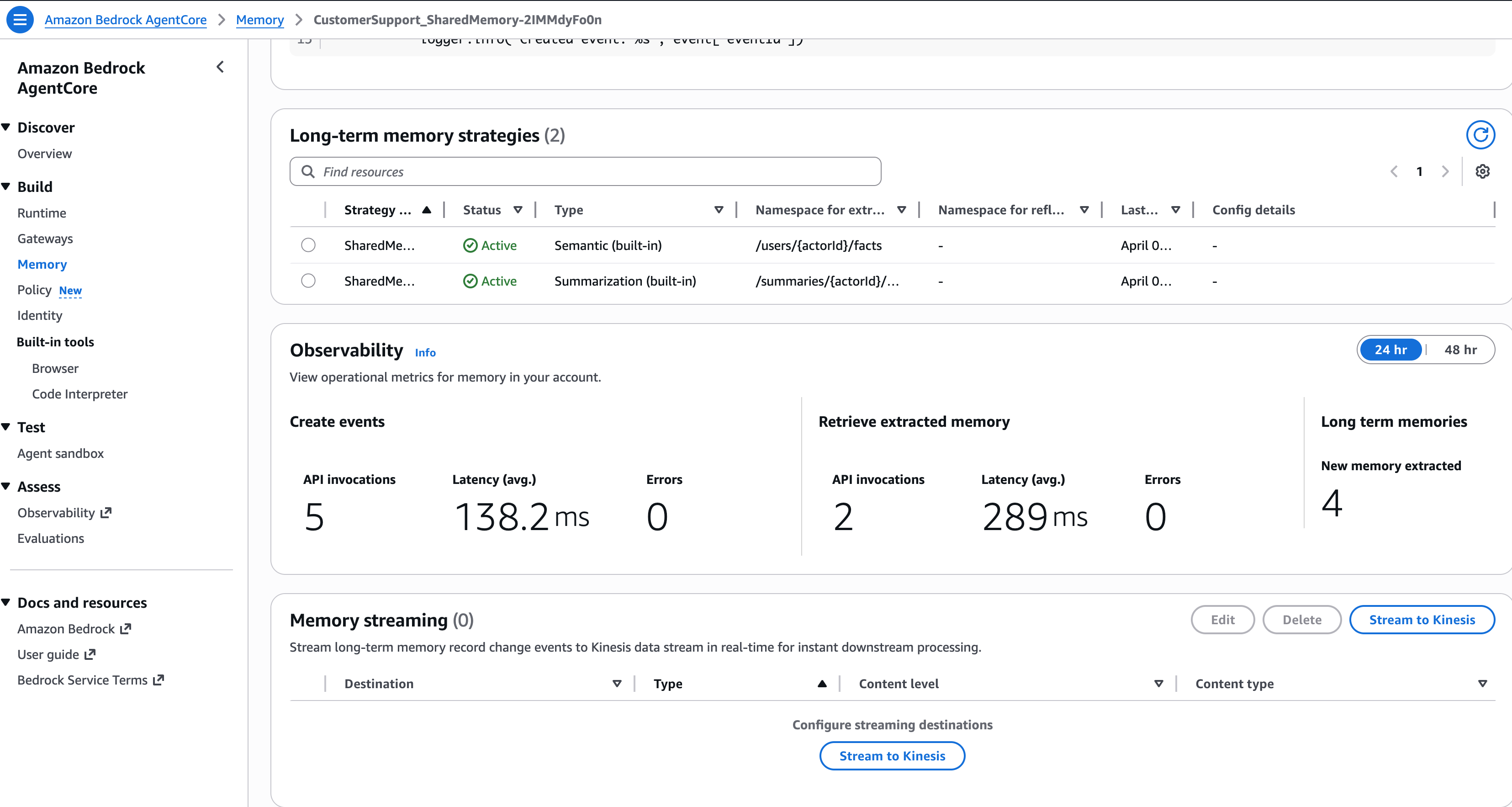
Agent 跨会话记住了我们! SEMANTIC 策略自动从第一次对话中提取了事实,并在第二次对话中使其可用。
总结
当我们运行 agentcore add memory 时,CLI:
- 更新了
agentcore.json—— 添加了包含 SEMANTIC 和 SUMMARIZATION 策略的记忆资源 - 配置了命名空间 —— 为语义事实设置了
/users/{actorId}/facts,为对话摘要设置了/summaries/{actorId}/{sessionId}
当我们将记忆功能集成到代码中时:
- 会话管理器 ——
AgentCoreMemorySessionManager挂接到 Strands Agent 生命周期 - 自动提取 —— 每次对话后,记忆服务异步提取事实并存储它们
- 自动检索 —— 在每次响应之前,记忆服务检索相关事实并将其注入 agent 的上下文中
| 发生了什么 | 策略 | 结果 |
|---|---|---|
| “My name is Sarah” | SEMANTIC | 提取为事实:“用户的名字是 Sarah” |
| “I prefer email updates” | SEMANTIC | 提取为事实:“Sarah 偏好电子邮件更新” |
| 完整对话 | SUMMARIZATION | 存储压缩摘要以保持会话连续性 |