集成Cognito
使用 Cognito 身份验证保护Runtime
到目前为止,我们的代理运行时接受未经身份验证的请求——任何拥有端点 URL 的人都可以调用它。对于生产应用程序,这是不可接受的。我们需要确保只有授权客户端才能调用我们的代理。
AgentCore Runtime 支持使用自定义 JWT 授权器进行基于 JWT 的身份验证。我们将配置Runtime,要求每个请求携带有效的 Cognito JWT 令牌。
从 Parameter Store 检索 Cognito 配置
之前的CloudFormation 堆栈已经将 Cognito 配置存储在 SSM Parameter Store 中。检索我们需要的值:
COGNITO_DISCOVERY_URL=$(aws ssm get-parameter \
  --name /app/customersupport/agentcore/cognito_discovery_url \
  --query 'Parameter.Value' --output text)

COGNITO_CLIENT_ID=$(aws ssm get-parameter \
  --name /app/customersupport/agentcore/client_id \
  --query 'Parameter.Value' --output text)

echo "Discovery URL: $COGNITO_DISCOVERY_URL"
echo "Client ID:     $COGNITO_CLIENT_ID"
更新 agentcore.json
在 Kiro 的编辑器中打开 agentcore/agentcore.json。在 runtimes 数组中,找到 "CustomerSupport" 条目,并添加 requestHeaderAllowlist、authorizerType 和 authorizerConfiguration 字段:
{
  "runtimes": [
    {
      "name": "CustomerSupport",
      "build": "CodeZip",
      "entrypoint": "main.py",
      "codeLocation": "app/CustomerSupport/",
      "runtimeVersion": "PYTHON_3_13",
      "networkMode": "PUBLIC",
      "protocol": "HTTP",
      "requestHeaderAllowlist": [
        "Authorization"
      ],
      "authorizerType": "CUSTOM_JWT",
      "authorizerConfiguration": {
        "customJwtAuthorizer": {
          "discoveryUrl": "<COGNITO_DISCOVERY_URL value>",
          "allowedClients": ["<COGNITO_CLIENT_ID value>"]
        }
      }
    }
  ]
}
将 <COGNITO_DISCOVERY_URL value> 和 <COGNITO_CLIENT_ID value> 替换为我们上面检索到的值。结果应类似如下(但使用我们自己的 discoveryUrl 和 allowedClients 值):
"requestHeaderAllowlist": [
  "Authorization"
],
"authorizerType": "CUSTOM_JWT",
"authorizerConfiguration": {
  "customJwtAuthorizer": {
    "discoveryUrl": "https://cognito-idp.us-east-1.amazonaws.com/us-east-1_aBcDeFgHi/.well-known/openid-configuration",
    "allowedClients": ["1abc2def3ghi4jkl5mno6pqr"]
  }
}
此配置的作用:
discoveryUrl指向 Cognito OIDC 发现端点,该端点告知 AgentCore Runtime 如何验证传入的 JWT 令牌(从哪里获取签名密钥、颁发者等)。allowedClients列表将访问限制为仅针对该特定 Cognito 应用客户端颁发的令牌——来自其他客户端的任何令牌都将被拒绝。requestHeaderAllowlist对下一个会话非常重要,一旦我们将 Cognito 身份验证添加到 AgentCore Gateway,它就是允许我们的代理将身份验证令牌传播到 MCP 客户端的请求头。
验证并部署更新后的配置
在部署之前,验证我们的 agentcore.json 更改是否正确:
agentcore validate
如果验证通过,我们将看到成功消息。如果存在问题(例如,缺少逗号、无效的 JSON 或格式错误的发现 URL),CLI 将准确告知我们问题所在,以便我们在部署前进行修复。

agentcore deploy -y -v
使用身份验证进行测试
部署后,未经身份验证的请求将被拒绝。我们需要先获取令牌:
# Get a machine-to-machine token from Cognito
COGNITO_CLIENT_SECRET=$(aws cognito-idp describe-user-pool-client \
  --user-pool-id $(aws ssm get-parameter --name /app/customersupport/agentcore/pool_id --query 'Parameter.Value' --output text) \
  --client-id $COGNITO_CLIENT_ID \
  --query 'UserPoolClient.ClientSecret' --output text)

COGNITO_TOKEN_URL=$(aws ssm get-parameter \
  --name /app/customersupport/agentcore/cognito_token_url \
  --query 'Parameter.Value' --output text)

COGNITO_AUTH_SCOPE=$(aws ssm get-parameter \
  --name /app/customersupport/agentcore/cognito_auth_scope \
  --query 'Parameter.Value' --output text)

TOKEN=$(curl -s -X POST "$COGNITO_TOKEN_URL" \
  -H "Content-Type: application/x-www-form-urlencoded" \
  -d "grant_type=client_credentials&client_id=${COGNITO_CLIENT_ID}&client_secret=${COGNITO_CLIENT_SECRET}&scope=${COGNITO_AUTH_SCOPE}" \
  | python3 -c "import sys,json; print(json.load(sys.stdin)['access_token'])")

echo "Token obtained successfully"
现在使用 bearer 令牌调用代理:
SESSION_C=$(python3 -c 'import uuid; print(uuid.uuid4())')
agentcore invoke "What's the return policy for electronics?" \
  --session-id $SESSION_C --bearer-token "$TOKEN" --stream
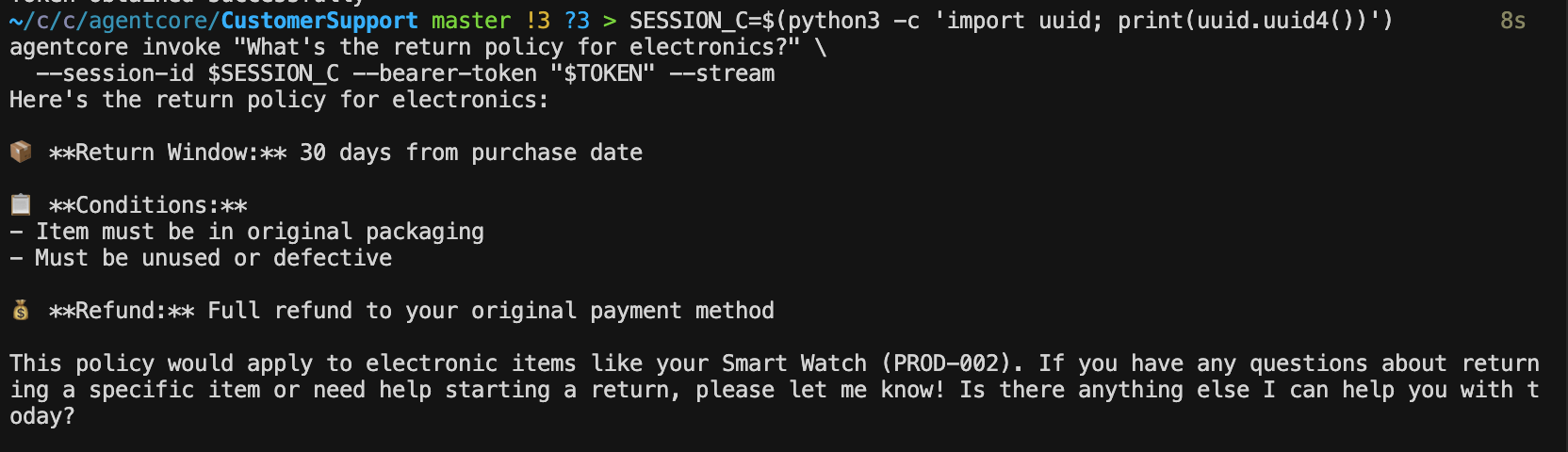
尝试不带令牌调用,以确认请求被拒绝:
agentcore invoke "What's the return policy for electronics?" \
  --session-id $SESSION_C --stream
我们应该看到身份验证错误——我们的运行时现在已受到保护。

使用 Cognito 身份验证保护我们的 Gateway
我们已经保护了运行时端点,但 AgentCore Gateway 也独立接受请求。为了全面锁定我们的应用程序,我们应该对 Gateway 应用相同的 JWT 身份验证,以确保只有授权的代理(或客户端)才能调用其背后的工具。
为什么也要保护 Gateway? 运行时和 Gateway 是独立的端点。仅保护运行时意味着拥有 Gateway URL 的人仍然可以直接调用我们的工具。通过对两者应用相同的 Cognito 授权器,我们可以确保端到端的身份验证——客户端向运行时进行身份验证,运行时的 MCP 客户端使用相同的令牌流向 Gateway 进行身份验证。
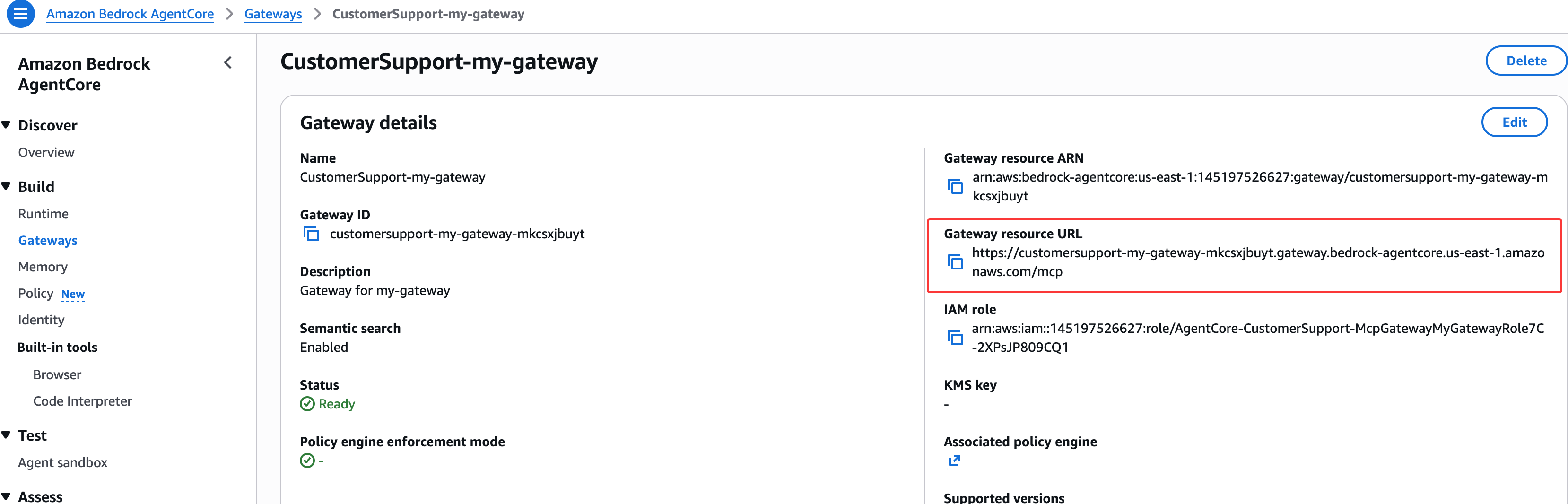
Gateway 授权器配置无法就地更新,因此我们需要删除现有 Gateway,部署删除操作,然后在启用身份验证的情况下重新创建它。
删除现有 Gateway
agentcore remove gateway --name my-gateway -y
部署删除操作,以便从 AWS 中删除旧 Gateway:
agentcore deploy -y -v
使用 JWT 身份验证重新创建 Gateway
现在创建一个从一开始就配置了 Cognito JWT 授权器的新 Gateway。我们将使用之前检索到的相同 SSM 参数值:
agentcore add gateway --name my-gateway-secure --runtimes CustomerSupport \
  --authorizer-type CUSTOM_JWT \
  --discovery-url $COGNITO_DISCOVERY_URL \
  --allowed-clients $COGNITO_CLIENT_ID
重新添加 warranty check 目标
Lambda ARN 应该仍在我们的 shell 中。如果没有,请重新检索:
WARRANTY_LAMBDA_ARN=$(aws ssm get-parameter \
  --name /app/customersupport/agentcore/warranty_check_lambda_arn \
  --query 'Parameter.Value' --output text)
将目标添加到新 Gateway:
agentcore add gateway-target \
  --type lambda-function-arn \
  --name WarrantyCheck \
  --lambda-arn $WARRANTY_LAMBDA_ARN \
  --tool-schema-file app/CustomerSupport/tool/warranty_schema.json \
  --gateway my-gateway-secure
注意: 新 Gateway 名称为
my-gateway-secure,因此注入的环境变量将为AGENTCORE_GATEWAY_MY_GATEWAY_SECURE_URL。我们还需要配置 MCPClient 的 Authorization 请求头。我们需要更新app/CustomerSupport/mcp_client/client.py以读取新的变量名并传递授权请求头:
打开 app/CustomerSupport/mcp_client/client.py 并更改环境变量名称:
两处更改:(1)Gateway URL 环境变量从 AGENTCORE_GATEWAY_MY_GATEWAY_URL 更改为 AGENTCORE_GATEWAY_MY_GATEWAY_SECURE_URL,以匹配新的安全 Gateway 名称。(2)get_gateway_mcp_client 函数现在接受一个 auth_header 参数,并将其作为 Authorization 请求头传递给 Gateway,以便将运行时的 JWT 令牌转发以验证 Gateway 请求。
import os
import logging
from mcp.client.streamable_http import streamablehttp_client
from strands.tools.mcp.mcp_client import MCPClient

logger = logging.getLogger(__name__)

# ExaAI MCP endpoint for web search
EXAMPLE_MCP_ENDPOINT = "https://mcp.exa.ai/mcp"


def get_streamable_http_mcp_client() -> MCPClient:
    """Returns an MCP Client for Exa AI web search"""
    return MCPClient(lambda: streamablehttp_client(EXAMPLE_MCP_ENDPOINT))


def get_gateway_mcp_client(auth_header: str) -> MCPClient | None:
    """Returns an MCP Client for AgentCore Gateway, if configured"""
    url = os.environ.get("AGENTCORE_GATEWAY_MY_GATEWAY_SECURE_URL")
    if not url:
        logger.warning("Gateway URL not set — gateway tools unavailable")
        return None
    return MCPClient(lambda: streamablehttp_client(
        url=url,
        headers={"Authorization": auth_header}
    ))
由于我们对 AgentCore Runtime 和 AgentCore Gateway 使用相同的 Cognito 客户端,我们需要更新 app/CustomerSupport/main.py 文件,以将授权请求头传递给我们的 Gateway:
invoke 函数现在从传入的请求上下文中提取 Authorization 请求头,并将其传递给 get_gateway_mcp_client。这将调用者的 JWT 令牌从 Runtime 传播到 Gateway,实现端到端身份验证。Gateway MCP 客户端现在在每个请求内部(在 invoke 中)创建,而不是在启动时创建,因为每个请求可能携带不同的令牌。
from strands import Agent, tool
from bedrock_agentcore.runtime import BedrockAgentCoreApp
from model.load import load_model
from mcp_client.client import get_streamable_http_mcp_client, get_gateway_mcp_client
from memory.session import get_memory_session_manager

app = BedrockAgentCoreApp()
log = app.logger

# --- Customer Support Tools ---

RETURN_POLICIES = {
    "electronics": {"window": "30 days", "condition": "Original packaging required, must be unused or defective", "refund": "Full refund to original payment method"},
    "accessories": {"window": "14 days", "condition": "Must be in original packaging, unused", "refund": "Store credit or exchange"},
    "audio": {"window": "30 days", "condition": "Defective items only after 15 days", "refund": "Full refund within 15 days, replacement after"},
}

PRODUCTS = {
    "PROD-001": {"name": "Wireless Headphones", "price": 79.99, "category": "audio", "description": "Noise-cancelling Bluetooth headphones with 30h battery life", "warranty_months": 12},
    "PROD-002": {"name": "Smart Watch", "price": 249.99, "category": "electronics", "description": "Fitness tracker with heart rate monitor, GPS, and 5-day battery", "warranty_months": 24},
    "PROD-003": {"name": "Laptop Stand", "price": 39.99, "category": "accessories", "description": "Adjustable aluminum laptop stand for ergonomic desk setup", "warranty_months": 6},
    "PROD-004": {"name": "USB-C Hub", "price": 54.99, "category": "accessories", "description": "7-in-1 USB-C hub with HDMI, USB-A, SD card reader, and ethernet", "warranty_months": 12},
    "PROD-005": {"name": "Mechanical Keyboard", "price": 129.99, "category": "electronics", "description": "RGB mechanical keyboard with Cherry MX switches", "warranty_months": 24},
}

@tool
def get_return_policy(product_category: str) -> str:
    """Get return policy information for a specific product category.

    Args:
        product_category: Product category (e.g., 'electronics', 'accessories', 'audio')

    Returns:
        Formatted return policy details including timeframes and conditions
    """
    category = product_category.lower()
    if category in RETURN_POLICIES:
        policy = RETURN_POLICIES[category]
        return f"Return policy for {category}: Window: {policy['window']}, Condition: {policy['condition']}, Refund: {policy['refund']}"
    return f"No specific return policy found for '{product_category}'. Please contact support for details."

@tool
def get_product_info(query: str) -> str:
    """Search for product information by name, ID, or keyword.

    Args:
        query: Product name, ID (e.g., 'PROD-001'), or search keyword

    Returns:
        Product details including name, price, category, and description
    """
    query_lower = query.lower()
    # Search by ID
    if query.upper() in PRODUCTS:
        p = PRODUCTS[query.upper()]
        return f"{p['name']} ({query.upper()}): ${p['price']}, Category: {p['category']}, {p['description']}, Warranty: {p['warranty_months']} months"
    # Search by keyword
    results = [f"{pid}: {p['name']} - ${p['price']} - {p['description']}" for pid, p in PRODUCTS.items()
               if query_lower in p['name'].lower() or query_lower in p['description'].lower() or query_lower in p['category'].lower()]
    if results:
        return "Found products:\n" + "\n".join(results)
    return f"No products found matching '{query}'."


# Agent factory — creates one agent per session/user combination
def agent_factory():
    cache = {}
    def get_or_create_agent(session_id, user_id, auth_header):
        # MCP clients: Exa AI (web search) + AgentCore Gateway (Lambda tools)
        mcp_clients = [get_streamable_http_mcp_client(), get_gateway_mcp_client(auth_header)]
        tools = [get_return_policy, get_product_info]

        # Add MCP client (Exa AI web search) to tools
        for mcp_client in mcp_clients:
            if mcp_client:
                tools.append(mcp_client)

        key = f"{session_id}/{user_id}"
        if key not in cache:
            cache[key] = Agent(
                model=load_model(),
                session_manager=get_memory_session_manager(session_id, user_id),
                system_prompt="""You are a helpful and professional customer support assistant for an e-commerce company.
Your role is to:
- Provide accurate information using the tools available to you
- Be friendly, patient, and understanding with customers
- Always offer additional help after answering questions
- If you can't help with something, direct customers to the appropriate contact

You have access to the following tools:
1. get_return_policy() - For return policy questions
2. get_product_info() - To look up product information and specifications
3. Web search - To search the web for troubleshooting help

Always use the appropriate tool to get accurate, up-to-date information rather than guessing.""",
                tools=tools
            )
        return cache[key]
    return get_or_create_agent

get_or_create_agent = agent_factory()

@app.entrypoint
async def invoke(payload, context):
    log.info("Invoking Agent.....")

    session_id = getattr(context, 'session_id', 'default-session')
    user_id = getattr(context, 'user_id', 'default-user')
    # Access request headers - handle None case
    request_headers = context.request_headers or {}

    # Get Client JWT token
    auth_header = request_headers.get('Authorization', '')

    print(f"Authorization header: {auth_header}")
    agent = get_or_create_agent(session_id, user_id, auth_header)

    stream = agent.stream_async(payload.get("prompt"))
    async for event in stream:
        if "data" in event and isinstance(event["data"], str):
            yield event["data"]


if __name__ == "__main__":
    app.run()
验证并部署
agentcore validate
agentcore deploy -y -v
测试已保护的 Gateway
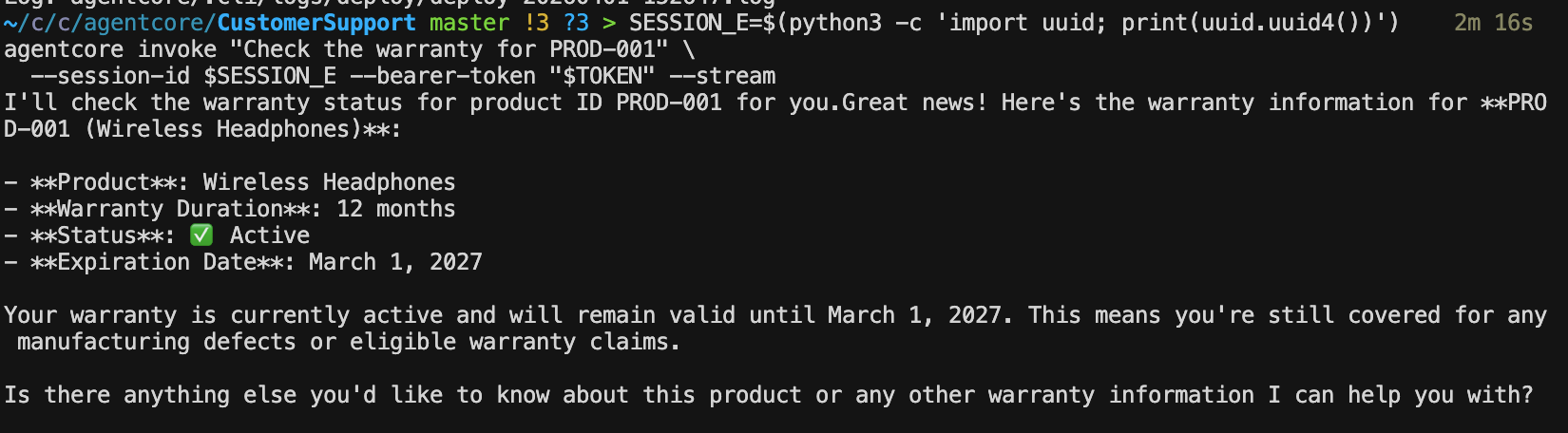
warranty check 工具通过 Gateway 进行调用。如果 Gateway 身份验证正常工作,使用有效令牌应该可以成功:
SESSION_E=$(python3 -c 'import uuid; print(uuid.uuid4())')
agentcore invoke "Check the warranty for PROD-001" \
  --session-id $SESSION_E --bearer-token "$TOKEN" --stream
Runtime和 Gateway 现在都使用相同的 Cognito 身份提供商进行了保护。
生成测试流量
让我们生成一些多样化的交互来填充可观测性仪表板。由于Runtime现在已受到保护,要包含 bearer 令牌:
SESSION_D=$(python3 -c 'import uuid; print(uuid.uuid4())')

agentcore invoke "What's the return policy for accessories?" \
  --session-id $SESSION_D --bearer-token "$TOKEN" --stream

agentcore invoke "Tell me about the USB-C Hub" \
  --session-id $SESSION_D --bearer-token "$TOKEN" --stream

agentcore invoke "Check the warranty for PROD-002" \
  --session-id $SESSION_D --bearer-token "$TOKEN" --stream

agentcore invoke "Do you remember my name?" \
  --session-id $SESSION_D --bearer-token "$TOKEN" --stream
运行这些命令后,等待几分钟,然后查看 CloudWatch 仪表板,以查看每次交互的追踪记录,包括调用了哪些工具以及每个步骤花费了多长时间。
Cognito 访问令牌有效期为 60 分钟(如前提条件堆栈中配置的)。如果一段时间后出现身份验证错误,只需重新运行之前的令牌命令:
TOKEN=$(curl -s -X POST "$COGNITO_TOKEN_URL" \
  -H "Content-Type: application/x-www-form-urlencoded" \
  -d "grant_type=client_credentials&client_id=${COGNITO_CLIENT_ID}&client_secret=${COGNITO_CLIENT_SECRET}&scope=${COGNITO_AUTH_SCOPE}" \
  | python3 -c "import sys,json; print(json.load(sys.stdin)['access_token'])")
架构
我们已部署的架构如下所示:
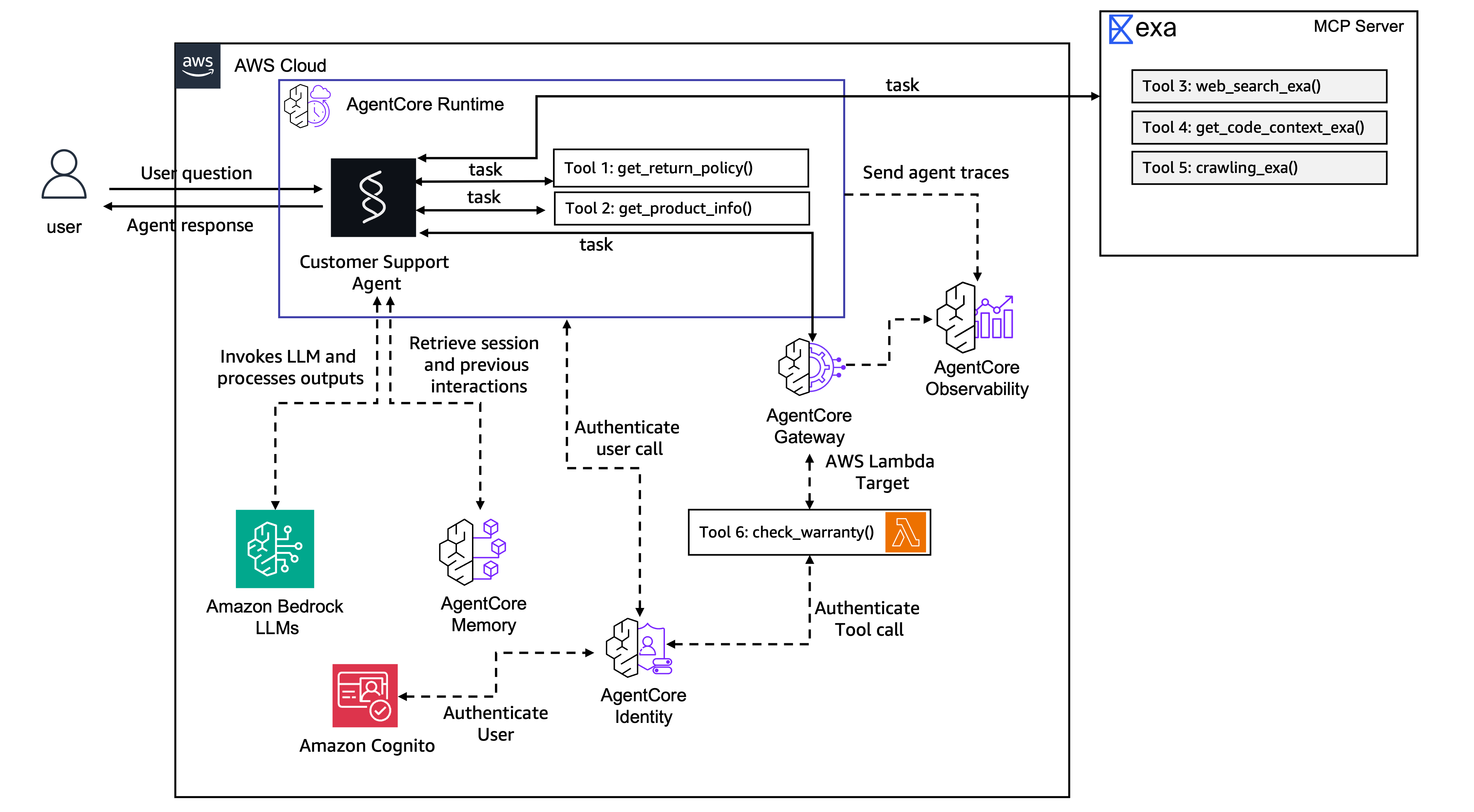
Client (with JWT token)
    ↓
Cognito validates token
    ↓
AgentCore Runtime (CustomerSupport)
    ├── Session management (isolated per session-id)
    ├── Memory (SEMANTIC + SUMMARIZATION)
    ├── Local tools: get_return_policy(), get_product_info()
    ├── MCP Client → Exa AI (web search)
    └── MCP Client → AgentCore Gateway → Lambda: check_warranty
                          ↓
                    CloudWatch (traces, logs, metrics)