多模态 - 图片识别
GPT-5.5 通过 Responses API 支持图像输入。
将下面图片保存为cost_explorer.png:
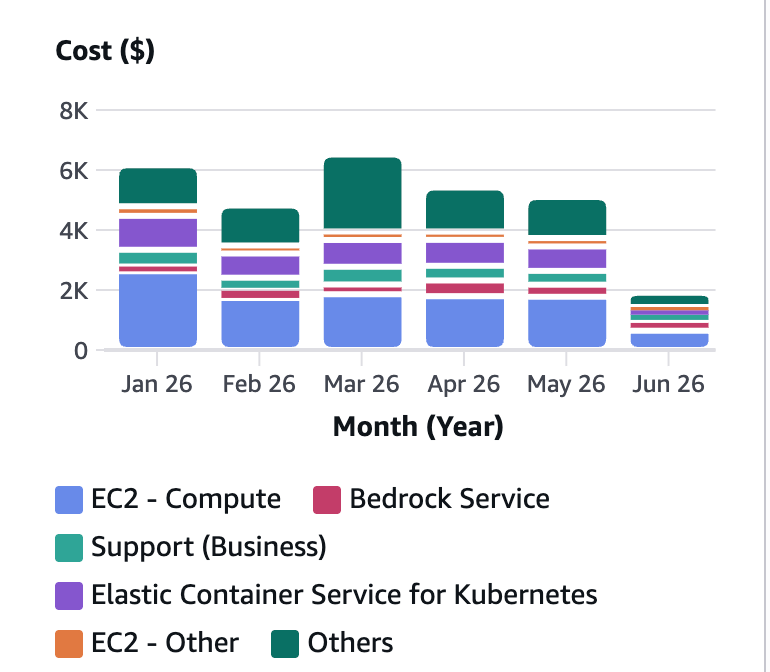
执行以下代码:
import os, base64, pathlib
from openai import OpenAI
from aws_bedrock_token_generator import provide_token

# Load your screenshot
img_path = pathlib.Path("cost_explorer.png")
if not img_path.exists():
    raise FileNotFoundError("Save the sample dashboard image as cost_explorer.png in this folder, or update img_path to your image file.")

b64 = base64.b64encode(img_path.read_bytes()).decode()


region = "us-east-1"
os.environ["OPENAI_BASE_URL"] = f"https://bedrock-mantle.{region}.api.aws/openai/v1"
os.environ["OPENAI_API_KEY"] = provide_token(region=region)


client = OpenAI()

response = client.responses.create(
    model='openai.gpt-5.5',
    input=[{
        "role": "user",
        "content": [
            {"type": "input_text", "text": "Analyze this AWS Cost Explorer dashboard. Identify the top cost drivers, month-over-month trends, and any services that warrant attention."},
            {"type": "input_image", "image_url": f"data:image/png;base64,{b64}"}
        ]
    }]
)

print(response.output_text)
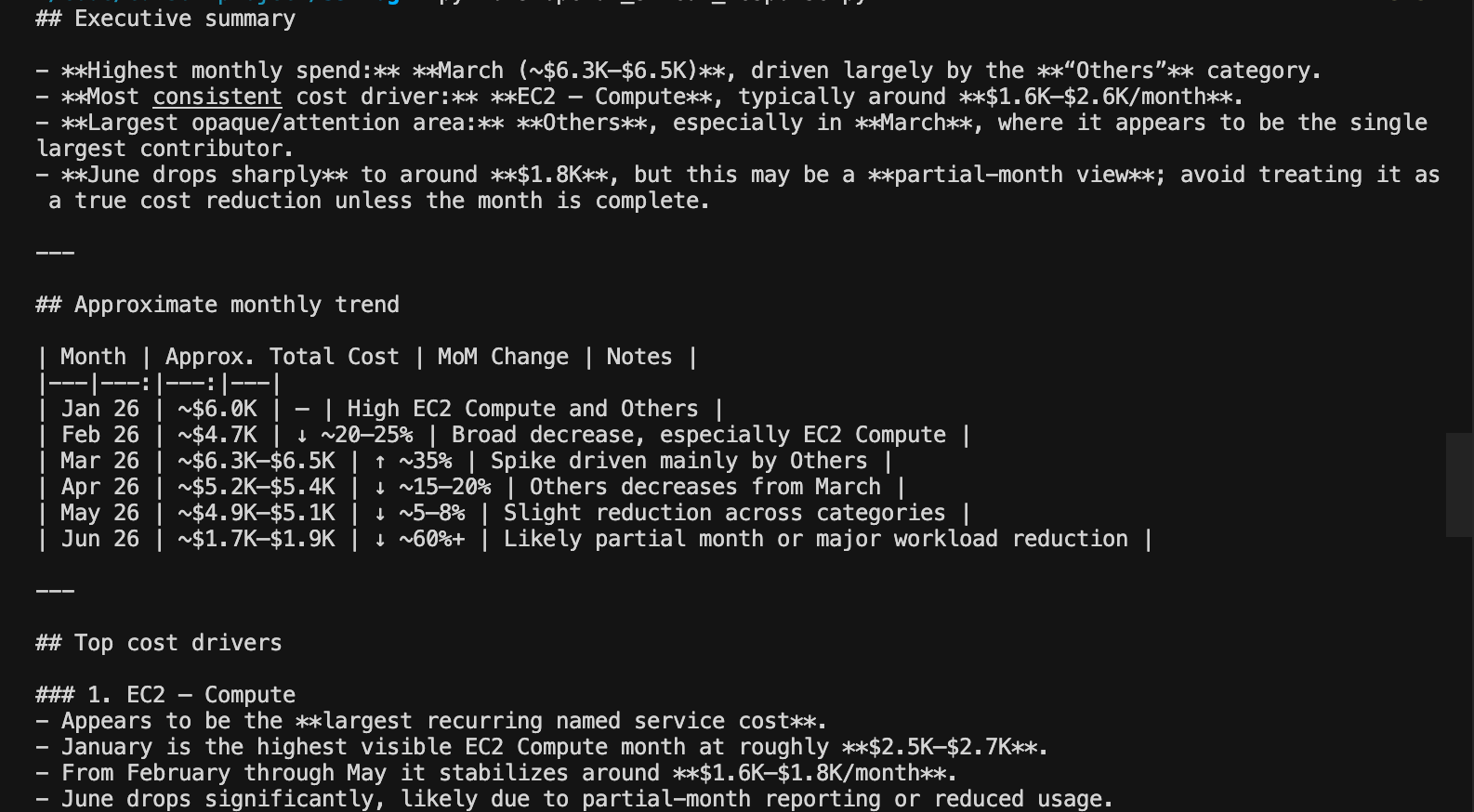
输出如下:
图片识别的detail参数
生产环境的仪表板通常有很小的坐标轴标签、密集的图例和小字体注释,这些都承载着关键信息。一个把 “$3,600” 误读为 “$3,000” 的模型会生成错误的成本报告。图像的 detail 设置让我们能够用延迟和 token 成本来换取对细粒度视觉细节的更好处理。
默认是auto级别:
{"type": "input_image", "image_url": f"data:image/png;base64,{b64}", "detail": "auto"}
快速分析时使用 auto,当小文本或密集的图表标签很重要时使用 high,但high 使用更多的输入 token(更高的成本)并且耗时略长。
何时使用各模式:
auto— 快速分析、摘要、识别趋势(大多数使用场景)high— 财务数据提取、合规文档、手写表单,或任何小文本很重要的图像
图像的结构化数据提取
一个能够读取 Cost Explorer 截图并输出 JSON 的 FinOps 管道,可以自动填充 Slack 警报、更新仪表板或触发预算工作流。这与智能文档处理(IDP)中用于发票、表单和收据的模式相同。
GPT-5.5 可以在一次请求中将视觉与结构化输出(text.format)相结合。
发送相同的 Cost Explorer 图像,但要求输出为结构化的 JSON。模型读取视觉数据并以机器可解析的格式返回,我们可以直接将其输入其他系统:
import os, base64, pathlib
from openai import OpenAI
from aws_bedrock_token_generator import provide_token


region = "us-east-1"
os.environ["OPENAI_BASE_URL"] = f"https://bedrock-mantle.{region}.api.aws/openai/v1"
os.environ["OPENAI_API_KEY"] = provide_token(region=region)


img_path = pathlib.Path("cost_explorer.png")
if not img_path.exists():
    raise FileNotFoundError("Save the sample dashboard image as cost_explorer.png in this folder, or update img_path to your image file.")

b64 = base64.b64encode(img_path.read_bytes()).decode()

client = OpenAI()

response = client.responses.create(
    model='openai.gpt-5.5',
    instructions="You are a FinOps data extraction system. Extract cost data from dashboard screenshots into structured JSON.",
    input=[{
        "role": "user",
        "content": [
            {"type": "input_text", "text": "Extract all visible cost data from this dashboard. Return JSON with keys: total_current_month, total_previous_month, cost_difference, cost_difference_percent, and services (array of {name, current_month_cost, previous_month_cost, change_percent})."},
            {"type": "input_image", "image_url": f"data:image/png;base64,{b64}", "detail": "high"}
        ]
    }],
    text={"format": {"type": "json_object"}}
)

# Parse and pretty-print the structured output
data = json.loads(response.output_text)
print(json.dumps(data, indent=2))

# Example: use the extracted data programmatically
print(f"\nTotal cost change: {data.get('cost_difference', 'N/A')}")
print(f"Top service: {data.get('services', [{}])[0].get('name', 'N/A')}")
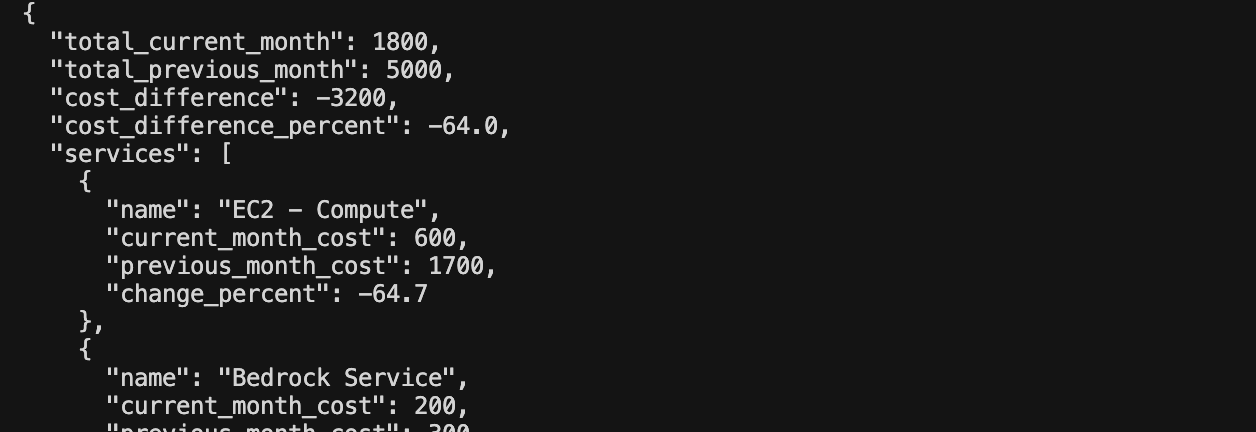
输出如下:
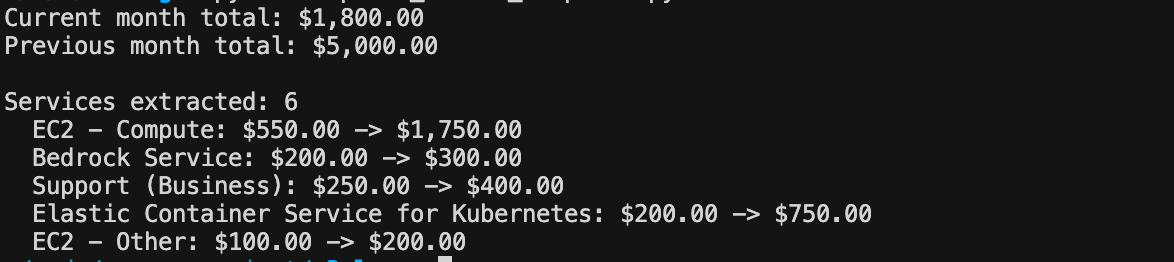
使用pydantic来保证类型安全:
import os, base64, pathlib
from openai import OpenAI
from aws_bedrock_token_generator import provide_token
import json
from pydantic import BaseModel

region = "us-east-1"
os.environ["OPENAI_BASE_URL"] = f"https://bedrock-mantle.{region}.api.aws/openai/v1"
os.environ["OPENAI_API_KEY"] = provide_token(region=region)

class ServiceCost(BaseModel):
    name: str
    current_month_cost: float
    previous_month_cost: float

class CostReport(BaseModel):
    total_current_month: float
    total_previous_month: float
    services: list[ServiceCost]

img_path = pathlib.Path("cost_explorer.png")
if not img_path.exists():
    raise FileNotFoundError("Save the sample dashboard image as cost_explorer.png in this folder, or update img_path to your image file.")

b64 = base64.b64encode(img_path.read_bytes()).decode()

client = OpenAI()

response = client.responses.parse(
    model='openai.gpt-5.5',
    instructions="Extract cost data from this dashboard screenshot.",
    input=[{
        "role": "user",
        "content": [
            {"type": "input_text", "text": "Extract all visible service costs from this dashboard."},
            {"type": "input_image", "image_url": f"data:image/png;base64,{b64}", "detail": "high"}
        ]
    }],
    text_format=CostReport,
)

report = response.output_parsed
print(f"Current month total: ${report.total_current_month:,.2f}")
print(f"Previous month total: ${report.total_previous_month:,.2f}")
print(f"\nServices extracted: {len(report.services)}")
for svc in report.services[:5]:
    print(f"  {svc.name}: ${svc.current_month_cost:,.2f} -> ${svc.previous_month_cost:,.2f}")
输出如下: